Case study / Game design
Glass Garden
A calm game about keeping something alive, one resource at a time.
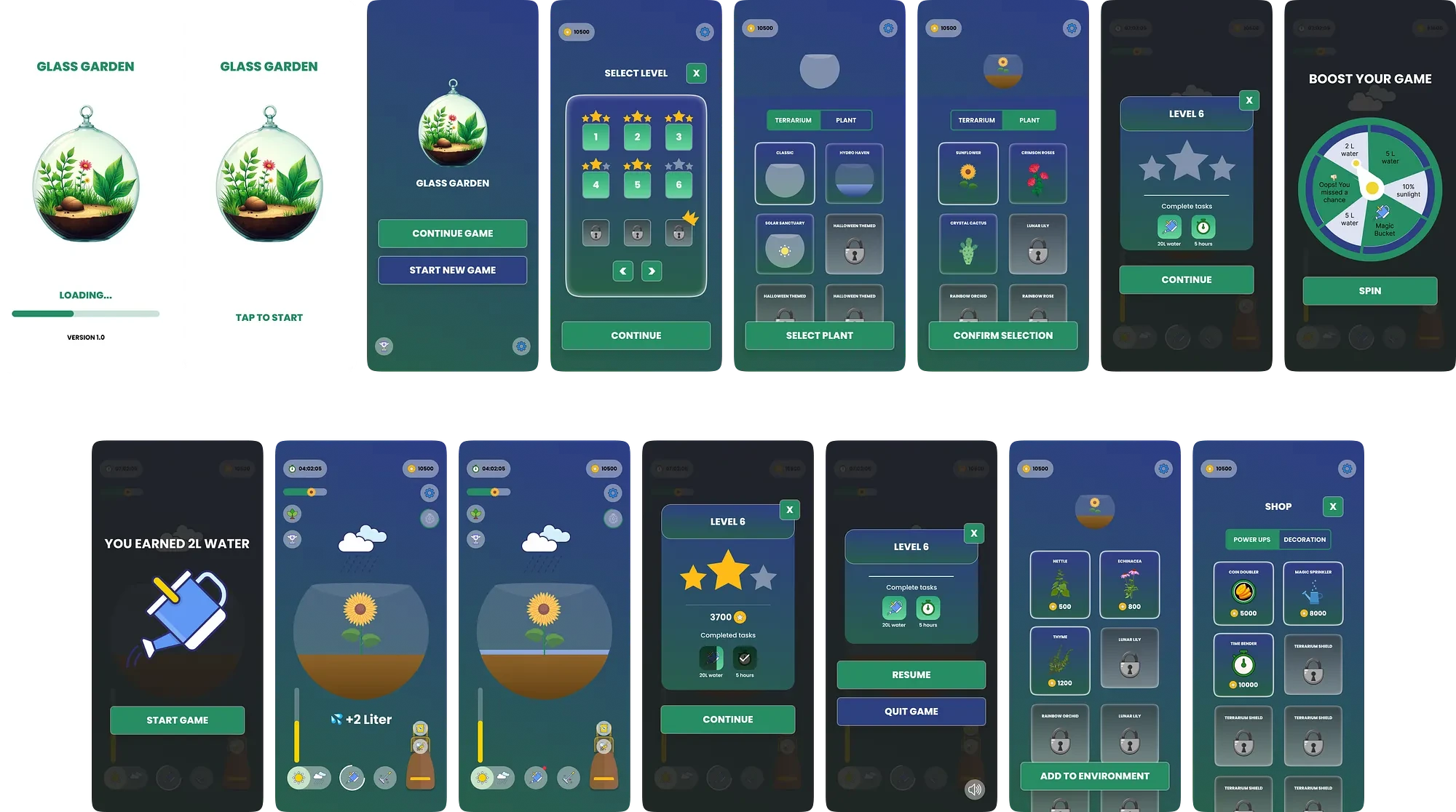
Glass Garden is a casual resource management game. You care for plants by balancing water, sunlight and nutrients until a terrarium thrives. Levels introduce pests and weather, and reward the care you take with decorations and creatures you can keep.
Design outcome
01 / The game
A terrarium you are responsible for.
Glass Garden is single player by design. The whole point is that this terrarium is yours: you choose the jar, you choose what goes in it, and what happens next is on you. A shared garden would dilute that.
- Genre
- Casual
- Players
- One
- Form
- 2D graphics
- Platform
- iOS, Android
- Engine
- Unity, C#
- Design
- Figma
02 / Look and feel
Calm enough to play before bed.
Soft pastels, organic shapes, nothing that flashes or shouts. The game is about patience, so the art had to feel like patience: a lit jar in a dark room, a plant that visibly leans toward the light you gave it.
03 / The loop
Pick, spin, tend, repeat.
You start a scenario by choosing a level, a terrarium and a plant. Then you water and light it to the amounts that level asks for. As the plant fills out you can add honeybees and frogs, which help it grow and defend it in the harder stages.
Before the level begins you spin a wheel. It can hand you a water or sunlight boost, or something better like the Magic Bucket that stores rainwater for when you run dry. It can also hand you bugs. That gamble sets the mood for the run.
Choose the level, the terrarium and the plant
Spin for a power-up, or for trouble
Water, light and feed to the amounts the level asks
Release creatures once the plant can support them
Survive the weather and whatever crawls in
Later levels bring themed events like Drought Day and Thunderstorms. Experience earned from healthy plants buys decorations and customisation, so a careful run makes the next jar look like yours.
04 / Winning and losing
Both endings are the same lesson.
Success
The plant reaches its full growth because the water, light and nutrients were right. Stars out of three are awarded on how efficiently you managed them, and the next level opens.
Failure
The plant dies: out of water, out of light, eaten by pests, or planted in a terrarium that was never going to suit it. You can retry as often as you like, but the next level stays shut until this one is done.
05 / Mechanics
What the player controls, and what the world does back.
In the player's hands
- 01WateringKeeps the plant hydrated so it neither wilts nor slows.
- 02SunlightDial the light up or down to push growth along.
- 03FertiliserSpeeds growth and adds health.
- 04PollinationBees and butterflies make plants bloom sooner, moving the level faster.
- 05Terrarium choiceSome jars grow faster or need less water. The right one is an advantage before you start.
- 06Animal bag timingRelease a creature at the right moment and it helps. Too early and it backfires.
In the world's hands
- 01PestsInsects damage plants and slow growth until you reach for the right pesticide.
- 02WeatherExtreme sun or cold can kill outright. You can counter by adjusting light and temperature.
- 03ScarcityWater and nutrients run out. Manage them badly and the plant withers.
- 04The wrong jarA rainforest terrarium for a cactus makes every later decision harder.
- 05Backup plantsLet the spares die and the soil suffers, which comes for the main plant too.
06 / Screens
Eight screens, and a reason for each.
- HomeEverything starts here.
- Terrarium creationSize and shape of the jar.
- Plant selectionPick a plant and read how it grows.
- GameplayWhere the tending happens.
- LevelThe goals and how far along you are.
- Spin wheelThe gamble before a run.
- AchievementsWhat has been earned and unlocked.
- SettingsAudio, notifications, display.
07 / The flow
Every path, including the ones that end badly.
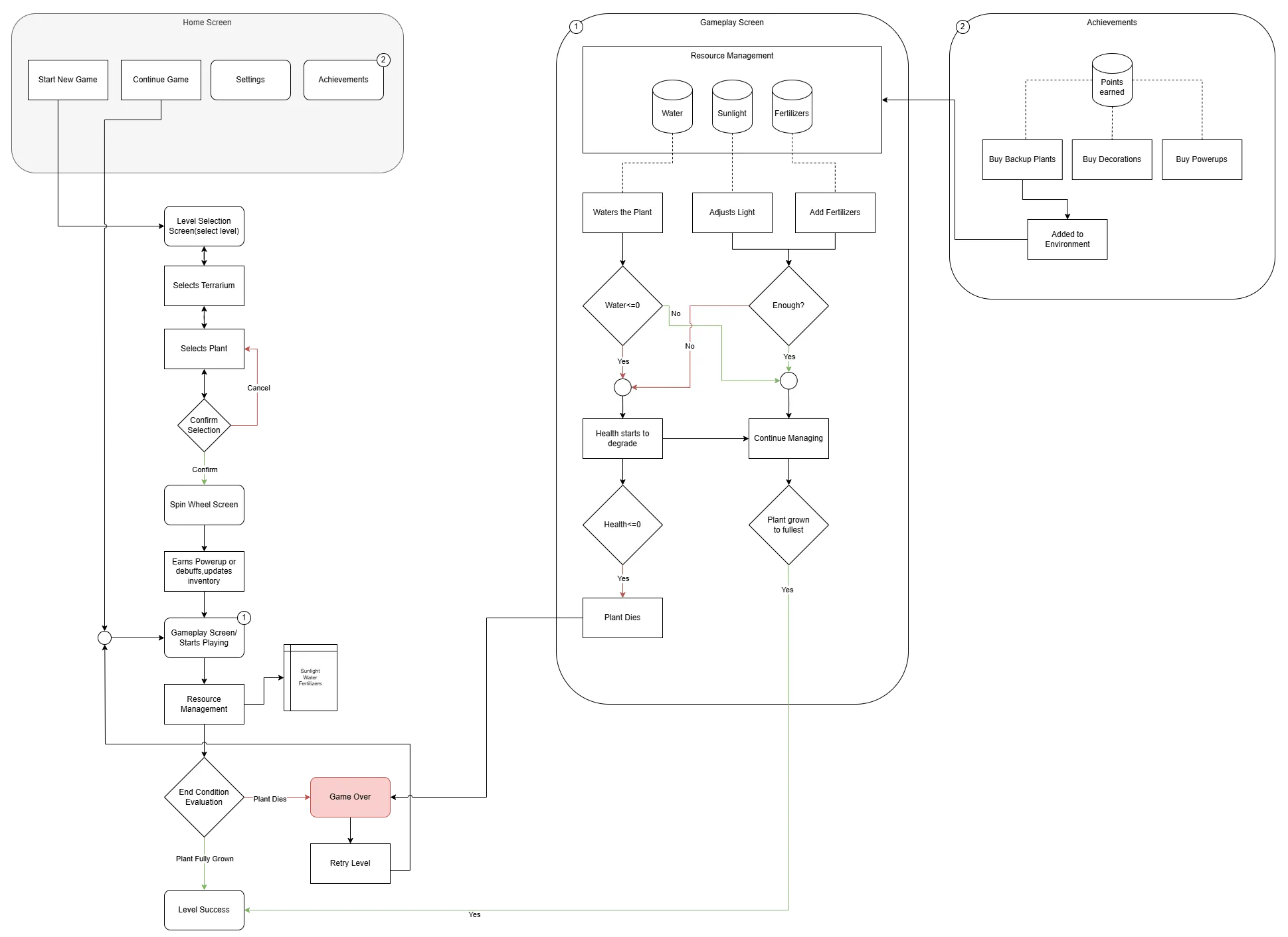
The flow maps the whole game: the home screen, the selection chain, the spin, the resource loop with its water and health checks, and the two ways a level can end. The gameplay screen and the achievements screen are drawn out separately because both feed back into the same resource pool.
08 / The screens
From the loading bar to the shop.
09 / Takeaways
Constraint is what makes care feel like care.
The game only works because the resources run out. Unlimited water would make a pretty screensaver; a fixed two litres makes you decide. Designing the scarcity, not the plants, was the real work.
The spin wheel taught me something similar. Handing players a power-up is pleasant, but handing them a bug occasionally is what makes the power-up matter.
Thank you for reading! :)